Introduction
Time series forecasting is a crucial aspect of many fields, such as finance, weather forecasting, stock market analysis, and many more. Time series analysis techniques can fine-tune the results derived from predictive analysis. This discipline usually forms part of advanced predictive analytics in an advanced professional course in data sciences, such as a Data Science Course in Bangalore. Traditional statistical methods like ARIMA and Exponential Smoothing have been widely used for time series forecasting. However, with the advent of deep learning, Long Short-Term Memory (LSTM) networks have gained popularity due to their ability to capture long-term dependencies in sequential data.
What is LSTM?
LSTM stands for Long Short-Term Memory. It is a type of recurrent neural network (RNN) architecture designed to address the vanishing gradient problem encountered in traditional RNNs. LSTM networks are capable of learning and remembering over long sequences, making them well-suited for time series forecasting.
Why Use LSTM for Time Series Forecasting?
Some of the main reasons for which LSTM is considered effective for time series analyses are listed here. Skills for using LSTM to develop time series models are much-sought after among professionals, especially among business strategists and market researchers. Thus, a Data Science Course in Bangalore, Mumbai, Pune, and such commercialised cities will find large-scale enrolment from these professionals.
- Handling Long-Term Dependencies: LSTMs can capture long-term dependencies in data, which is often essential for time series forecasting.
- Flexibility: LSTMs can model complex non-linear relationships and are not limited to linear dependencies.
- Adaptive Learning: LSTMs can learn directly from the data without requiring extensive manual feature engineering.
Building an LSTM Model Using Keras
Keras is a high-level neural networks API, written in Python and capable of running on top of TensorFlow. Skills in building an LSTM model for time series forecasting using Keras can be acquired by attending Data Scientist Classes that focus on advanced topics in predictive analysis.
Here is a step-by-step guide to building an LSTM model for time series forecasting using Keras.
Step 1: Import Libraries
import numpy as np
import pandas as pd
from keras.models import Sequential
from keras.layers import LSTM, Dense
from sklearn.preprocessing import MinMaxScaler
import matplotlib.pyplot as plt
Step 2: Load and Prepare the Data
For demonstration purposes, let us use a sample time series dataset. Assume we have a CSV file named data.csv with a single column value representing our time series data.
# Load the dataset
data = pd.read_csv(‘data.csv’)
# Normalize the data
scaler = MinMaxScaler(feature_range=(0, 1))
scaled_data = scaler.fit_transform(data)
# Split the data into training and testing sets
train_size = int(len(scaled_data) * 0.8)
train_data, test_data = scaled_data[:train_size], scaled_data[train_size:]
# Convert the data to a supervised learning problem
def create_dataset(dataset, look_back=1):
X, Y = [], []
for i in range(len(dataset) – look_back – 1):
a = dataset[i:(i + look_back), 0]
X.append(a)
Y.append(dataset[i + look_back, 0])
return np.array(X), np.array(Y)
look_back = 1
X_train, y_train = create_dataset(train_data, look_back)
X_test, y_test = create_dataset(test_data, look_back)
# Reshape the input to be [samples, time steps, features]
X_train = np.reshape(X_train, (X_train.shape[0], 1, X_train.shape[1]))
X_test = np.reshape(X_test, (X_test.shape[0], 1, X_test.shape[1]))
Step 3: Build the LSTM Model
model = Sequential()
model.add(LSTM(50, return_sequences=True, input_shape=(1, look_back)))
model.add(LSTM(50))
model.add(Dense(1))
model.compile(optimizer=’adam’, loss=’mean_squared_error’)
model.summary()
Step 4: Train the Model
history = model.fit(X_train, y_train, epochs=100, batch_size=1, validation_data=(X_test, y_test), verbose=2)
Step 5: Make Predictions
train_predict = model.predict(X_train)
test_predict = model.predict(X_test)
# Inverse transform the predictions
train_predict = scaler.inverse_transform(train_predict)
test_predict = scaler.inverse_transform(test_predict)
# Inverse transform the actual values
y_train = scaler.inverse_transform([y_train])
y_test = scaler.inverse_transform([y_test])
Step 6: Evaluate the Model
# Calculate root mean squared error
train_score = np.sqrt(np.mean((train_predict – y_train) ** 2))
test_score = np.sqrt(np.mean((test_predict – y_test) ** 2))
print(f’Train Score: {train_score:.2f} RMSE’)
print(f’Test Score: {test_score:.2f} RMSE’)
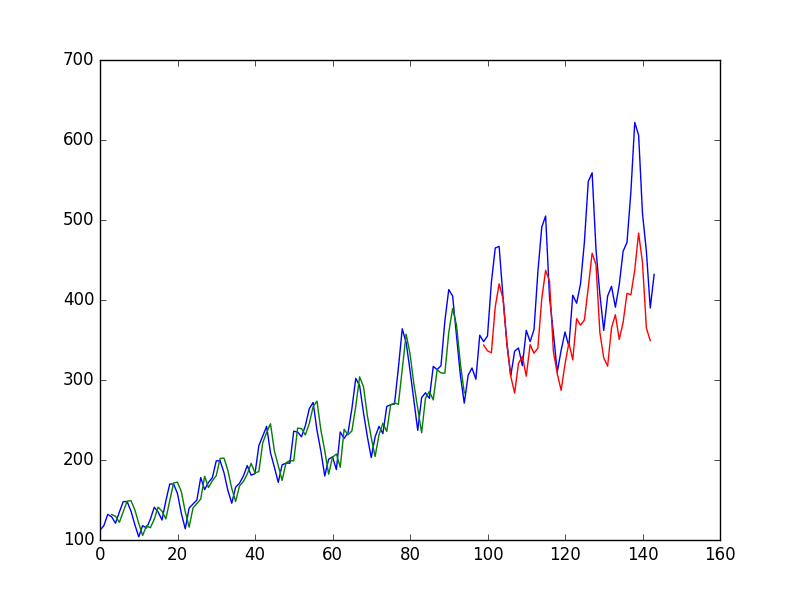
Step 7: Plot the Results
# Shift train predictions for plotting
train_predict_plot = np.empty_like(scaled_data)
train_predict_plot[:, :] = np.nan
train_predict_plot[look_back:len(train_predict) + look_back, :] = train_predict
# Shift test predictions for plotting
test_predict_plot = np.empty_like(scaled_data)
test_predict_plot[:, :] = np.nan
test_predict_plot[len(train_predict) + (look_back * 2) + 1:len(scaled_data) – 1, :] = test_predict
# Plot baseline and predictions
plt.figure(figsize=(10, 6))
plt.plot(scaler.inverse_transform(scaled_data), label=’True Data’)
plt.plot(train_predict_plot, label=’Train Predict’)
plt.plot(test_predict_plot, label=’Test Predict’)
plt.legend()
plt.show()
Conclusion
Using LSTM networks for time series forecasting offers a powerful alternative to traditional methods. By leveraging the strengths of LSTM networks in capturing long-term dependencies and modelling complex patterns, we can achieve more accurate and reliable forecasts. Keras provides a user-friendly API to build and train LSTM models, making it accessible even for those new to deep learning. If you are a data analyst seeking to hone your skills in predictive analytics, consider enrolling in Data Scientist Classes that include lessons in using LSTM networks.
For More details visit us:
Name: ExcelR – Data Science, Generative AI, Artificial Intelligence Course in Bangalore
Address: Unit No. T-2 4th Floor, Raja Ikon Sy, No.89/1 Munnekolala, Village, Marathahalli – Sarjapur Outer Ring Rd, above Yes Bank, Marathahalli, Bengaluru, Karnataka 560037
Phone: 087929 28623
Email: enquiry@excelr.com